 WhatSync


Connect WhatsApp to Attio
WhatSync copies your team's WhatsApp chats into Attio as they happen. Each message becomes a note on the right person, so anyone can see what was said without asking for a screenshot. Setup takes a couple of minutes.
Set up in 4 steps
- Connect Attio. Sign in with Attio. We create the WhatsApp fields on your People records for you. Open the app
- Connect WhatsApp. Almost everyone links the WhatsApp on the phone they already message customers from. Which one do I need?
- Decide which chats sync. By default every chat syncs except the numbers you exclude. Switch to include mode to sync only a short list. See the settings
- Check Attio. New messages land on People records within seconds. Can't see them? Sort the People list. Where to look
Which WhatsApp to connect
You send the messages
Link your WhatsApp
Keep messaging from the WhatsApp on your phone, normal or Business app. We copy the chats into Attio. This is what most sales and support teams want.
Link your WhatsAppAttio sends the messages
Connect through Meta
For reminders and follow-ups that go out with nobody pressing send. You still use your own number, but every message must be a template Meta approves first, and Meta charges per message.
Connect through Meta| Question | Link your WhatsApp | Connect through Meta |
|---|---|---|
| What you connect | The WhatsApp on your phone | Your own number, through Meta |
| How you connect it | Link it from your phone, once | Sign in with Meta and pick the number |
| Who presses send | You or a teammate, in WhatsApp | Attio workflows, automatically |
| One-to-one chats sync to Attio | Yes | Yes |
| Group chats sync to Attio | Yes, the groups you pick | No. Meta does not offer them |
| Attio workflows send messages | No | Yes, with approved templates |
| Marketing to a list | No. WhatsApp's rules forbid it on a linked number | Yes, to people who opted in |
| Meta approves your wording | No | Yes, every template |
| What it costs on top | Nothing | Meta charges per message |
| Time to get running | A couple of minutes | Longer. Meta reviews your business and templates |
Where your chats appear
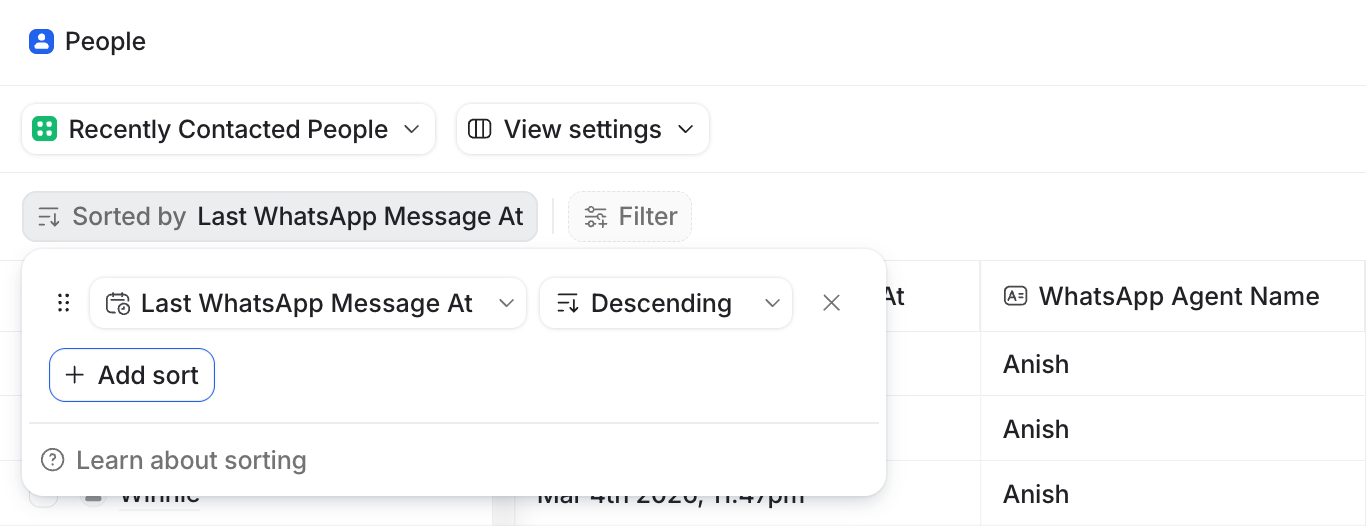
- Open the People object in Attio.
- Add a sort on Last WhatsApp Message At.
- Set it to descending. The newest chats are now at the top.
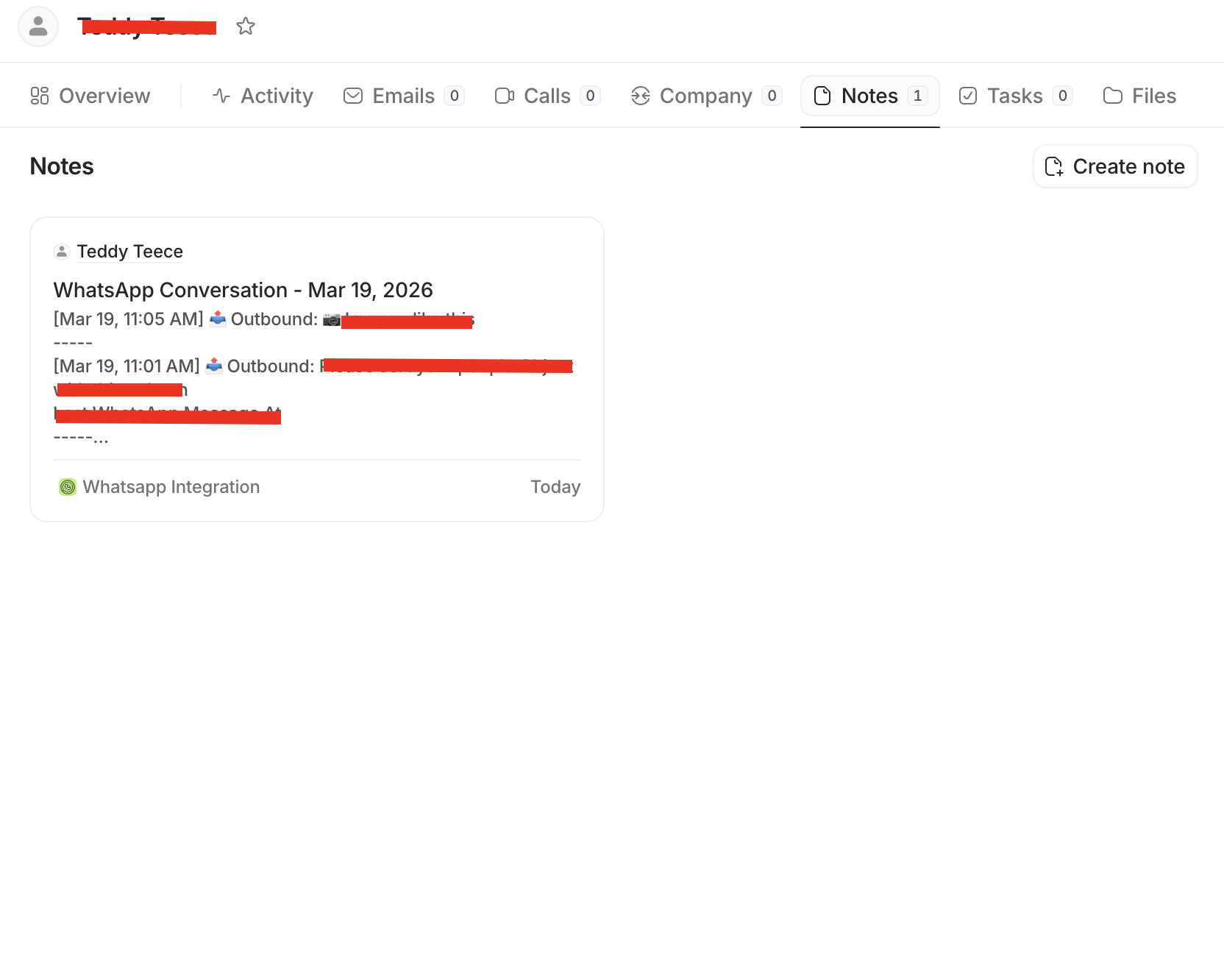
Open any of those people and the conversation is saved as Attio notes. The list finds the contact; the record holds the history.
Every setting explained
Which chats sync
- Number Filter Mode
- Decides which phone numbers reach Attio. Exclude mode, the default, syncs everything except the numbers on your list, so you can keep family, friends and internal chats out. Include mode syncs only the numbers on your list. Add numbers one at a time or upload a CSV, with a short reason for each.
- Auto-include Attio people
- Keeps your include list in step with your CRM. Include mode only. Any number that already belongs to a person in Attio starts syncing on its own. Numbers added this way are labelled.
- Group Sync
- Logs the group chats you choose. Off until you turn it on. Each group you tick gets its own person record in Attio, named after the group, with the sender's name on every message. Linked WhatsApp only: the Business API has no group chats.
What gets written into Attio
- Default Sharing
- Decides whether message text is written into Attio. Full access writes the conversation notes and the WhatsApp fields. Metadata only writes the fields (dates, counts, direction, teammate and chat link) and no message text.
- Note Destination
- Chooses which Attio object gets the conversation notes. People by default. Point it at another object, like deals, and the note goes to every linked record, or to the matched person if nothing is linked. The WhatsApp fields always stay on the person.
- Phone match fields
- Tells us where your phone numbers live in Attio. We match against Attio's standard phone field. If you also keep numbers in a custom field, like a second mobile, add it here so fewer messages create duplicate people.
- Timezone
- Sets the clock used in synced notes. Every time written into a note uses the timezone you pick.
Access and teammates
- Team Access
- Lets teammates sync into the same Attio workspace. The owner holds the Attio connection and the settings. Each teammate links their own WhatsApp, and everything lands in the same workspace. Invite codes have a usage limit and expire after 1 to 30 days, and you can revoke one any time.
- Access link
- Your private way back into the app. A link that signs you in on any device. Treat it like a password: anyone with it can open your account.
Sending from Attio
Sending from workflows runs on the WhatsApp Business API, so it needs templates Meta has approved. Your workflow calls WhatSync with a template name and the values to fill in, and we pass it to Meta. The guide walks through creating a template, finding your connection ID and key, and the exact request.
Read the sending guideWriting a template? Check it first with the free template builder.
Connect your AI app
Your AI app signs in to WhatSync and can search the chats you sync, show who is waiting on a reply, and draft follow-ups that know what was agreed. If you allow it, it can also send one message at a time. Keep the send tool on Ask so you check each one.
| What the AI app can do | Member | Admin |
|---|---|---|
| Read your own conversations | Yes | Yes |
| Search across your own chats | Yes | Yes |
| Read a teammate's conversations | No | No |
| List everyone who has connected WhatsApp | No | No |
| Read the shared team inbox | No | No |
| Find attachment captions and document names | Yes | Yes |
| Search inside documents or images | No | No |
| Transcribe and search voice notes | No | No |
| Chats you excluded with the number filter | No | No |
| Prepare one message for your approval | Yes | Yes |
| Send without your approval | No | No |
MCP server URL
https://whatsync.app/api/mcp
Your sync settings still apply: excluded numbers and groups you never ticked stay out of reach.
Attio fields
| Field in Attio | Slug | Type | Use it for |
|---|---|---|---|
| Last WhatsApp Message At | whatsapp_last_message_at | Timestamp | Sort People by this to see the newest chats first |
| Last Contact By Client | whatsapp_last_inbound_date | Date | The day the contact last messaged you |
| Last Contacted Client | whatsapp_last_outbound_date | Date | The day you last messaged the contact |
| WhatsApp Conversation Started | whatsapp_first_contact_date | Date | The first exchange we know about |
| Last Inbound WhatsApp Message | whatsapp_last_inbound_message | Text | The latest message from the contact |
| Last Outbound WhatsApp Message | whatsapp_last_outbound_message | Text | The latest message you sent |
| Total WhatsApp Messages | whatsapp_total_messages | Number | Messages in and out, handy for spotting quiet accounts |
| WhatsApp Conversation | whatsapp_conversation_link | Text | A wa.me link that opens the chat |
| WhatsApp Phone Number (Raw) | whatsapp_phone_number | Text | The raw number, kept as a matching fallback |
| WhatsApp Message Text | whatsapp_message_text | Text | The latest tracked message |
| WhatsApp Message Date | whatsapp_message_date | Date | Date of that message, for filters and reports |
| WhatsApp Message Direction | whatsapp_message_direction | Select | Whether that message was inbound or outbound |
| WhatsApp Agent Number | whatsapp_agent_number | Text | Which of your numbers handled the chat |
| WhatsApp Agent Name | whatsapp_agent_name | Text | Which teammate handled the chat |
Videos
Fixing common problems
- WhatsApp says connected, but Attio looks empty
- Almost always the data is there and the list is sorted another way. Open People and sort by Last WhatsApp Message At, newest first. How to sort
- One contact never shows up
- Check your number filter mode. In exclude mode the number may be on the excluded list; in include mode it syncs only if it is on the include list. Numbers need their country code.
- Fields update, but notes have no message text
- Default Sharing is set to metadata only, which holds the text back on purpose. Switch it to full access to write the conversation out.
- Notes land on the wrong record, or a duplicate person appears
- We could not match the number to an existing person, so a new one was created. Add the Attio field where you keep that number to your phone match fields, and check the note destination.
- Group messages are not syncing
- Group Sync is off by default, and only the groups you tick sync. It needs a linked WhatsApp; the Business API has no group chats.
- A template send from a workflow fails
- Usually the template is not approved yet, the name or language code does not match Meta exactly, the template has a media header the API cannot send yet, or the values are in the wrong order. See the sending guide.
Still stuck? Email hello@whatsync.app, with the number you expected to see.
Questions
- Does this work with my existing WhatsApp?
- Yes. Link it from the phone you already message customers from. You keep using WhatsApp as normal.
- Do I need approval from Meta?
- Not for linking your WhatsApp. Only if you want Attio workflows to send messages on their own, or send to a list. That route uses templates Meta approves, and Meta charges per message.
- Do I have to create fields in Attio first?
- No. We add the WhatsApp fields to your People records the first time you connect, and keep them updated.
- Do my personal chats end up in the CRM?
- Only if you let them. By default every chat syncs and you exclude the numbers you want kept out. Prefer the opposite? Switch to include mode, and nothing syncs unless the number is on your list.
- Can my team see who was contacted without reading the messages?
- Yes. Set Default Sharing to metadata only. Attio then gets who was contacted, when, how often and a link to the chat, but no message text.
- Does everyone on my team need their own setup?
- Each person links their own WhatsApp, and every chat lands in the same Attio workspace. One person owns the Attio connection and the settings.
- Are photos, documents and voice notes saved?
- On a linked WhatsApp, files shared in the chats you sync are saved with those chats in WhatSync. Attio gets the message record and the caption or file name.
- Will I lose old chats?
- No. Connecting does not delete anything in WhatsApp or Attio. New messages sync from the moment you connect.